Lesson Planner · Pro Feature

A lesson plan generator tied to your real timetable

Most AI lesson planners start from a blank box and know nothing about your week. This one plans from a slot in your timetable, so it already knows the class, the subject and how long the lesson is. It drafts the structure; you keep the professional judgement.

Lesson Planner is available on the Pro plan · £3.49/month or £34.99/year

📅 Plans from your timetable ⏱️ Timed activity sequence 🧩 Adaptations and assessment ✏️ You edit every word 📋 See our AI transparency page

Why generic AI lesson planners miss the mark

A plan is only useful if it fits the lesson you actually teach.

Generic AI tools have no idea what you teach. Every time, you retype the class, the year group, the subject and how long the lesson is, then translate the output out of American phrasing and into the language your school uses. It is faster than a blank page, but not by much.

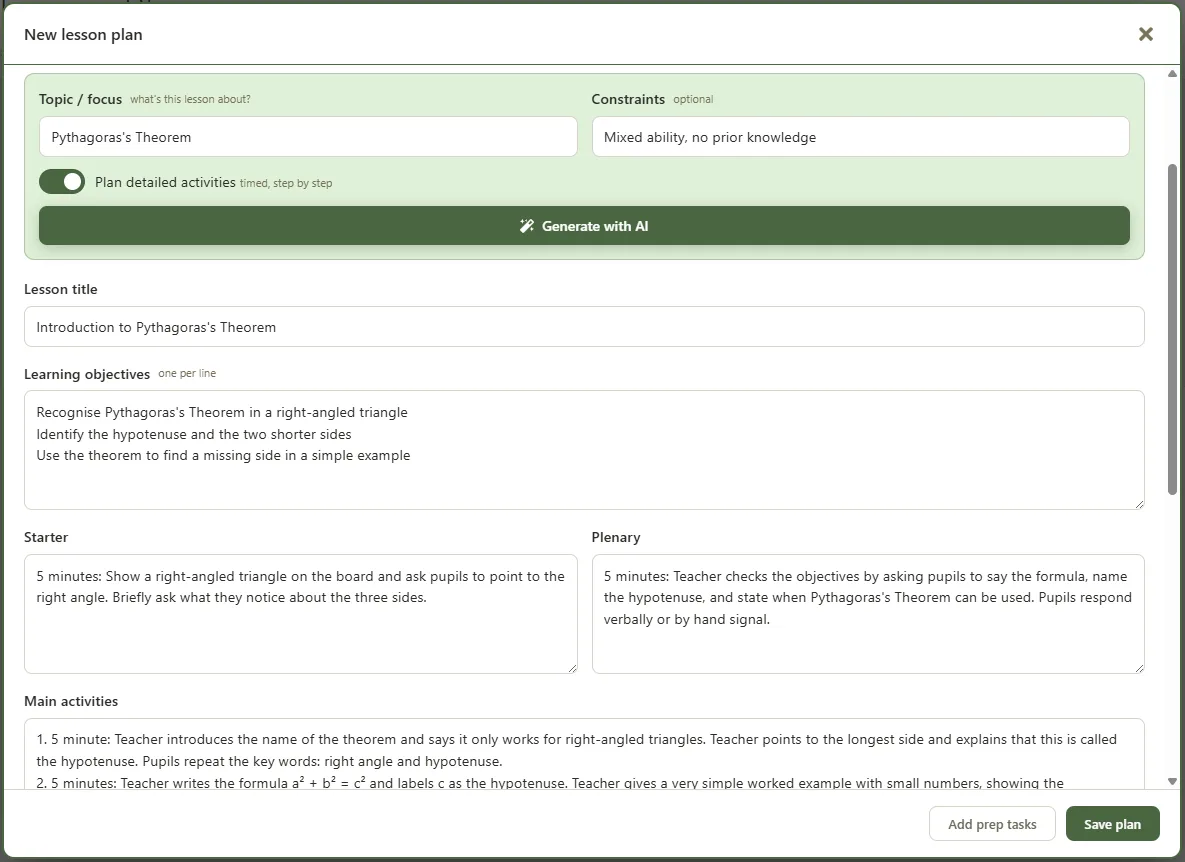
The Teacher Task Manager lesson planner starts from your timetable instead. Open any teaching slot and the subject, class and lesson length are already there. Ask for a plan and you get objectives, a timed sequence of activities, adaptations and assessment in British English, pitched for the year group and the time you actually have. For cover lessons, form time and one-off sessions that are not on your timetable, you can write a standalone plan in the same editor.

What the lesson planner does

Drafts the structure in seconds, then hands it to you to refine.

📅
Plan from a timetable slot

Open a lesson from your week and the subject, class and length are already filled in. Add a topic and generate, with no context to retype.

⏱️
Timed activity sequence

Turn on detailed activities for a step-by-step plan with timings, saying what the teacher does and what pupils do, that adds up to the lesson length.

🧩
Adaptations and assessment

Every plan includes support and stretch, plus assessment for learning, so the basics of adaptive teaching are there to build on.

🔁
Carry over from last lesson

Pull the objectives from your previous saved lesson for that class so the next plan follows on, rather than starting from scratch.

📄
Standalone plans

Plan a cover lesson, form time, an assembly or any one-off that is not on your timetable, in the same editor with its own subject and length.

Add prep tasks

Turn a plan's resources into a prep task in your task list with a due date, so what you need is ready before the lesson.

From a slot to a plan

A real example, generated and ready to edit.

Year 9 Science · Photosynthesis: inputs and outputs · 50 minutes · detailed activities
Generated plan: Objectives: identify the inputs and outputs of photosynthesis; explain where it happens in the plant. Starter (5 min): pupils list what a plant needs to grow, then share answers. Main (35 min): teacher explains inputs and outputs with a labelled diagram (10 min); pupils complete a matching task in pairs (10 min); class reviews answers (5 min); short video of oxygen bubbles from pondweed, pupils note what it shows (10 min). Plenary (10 min): exit question checking the word equation. Adaptations: sentence starters for support, a "why" extension question for the most able. Assessment: questioning during the main activity and the exit task.

Your data and the AI

To draft a plan, the assistant uses the subject, class, topic, lesson length and any constraints you give it, plus a short summary of your previous saved lesson for that class. That is all it needs, and it is sent only when you ask for a plan.

Plans are generated in real time and are not stored beyond the request, your data is never used to train AI models, and the finished plan is yours to edit and keep. You can see exactly what is sent and what is returned on our AI & Data transparency page.

Frequently asked questions

Is the lesson planner free?
The lesson planner is a Pro feature, from £3.49 a month or £34.99 a year. The rest of the app is free to use, with no card needed to start.
Does it know my timetable?
Yes. You plan from a slot in your own timetable, so the class, subject and lesson length are already filled in. That means less typing and a plan that fits the lesson you actually teach.
Can I plan a cover or one-off lesson?
Yes. As well as planning from your timetable, you can write a standalone plan for a cover lesson, form time, an assembly or any one-off that is not on your timetable.
Does it replace my planning?
No. It drafts the structure to save you time, then you edit every word and keep the professional judgement. The plan is yours.

Plan a lesson in minutes, not a free period

The Lesson Planner is part of Teacher Task Manager Pro: £3.49 a month or £34.99 a year. The rest of the app is free to use first.

Get started free View Pro pricing