Google Calendar and other general calendar apps don’t know what an INSET day is, can’t colour-code deadlines by term time versus holidays, and have never heard of a bell schedule. Teacher Task Manager is a teacher calendar app built around the way a school year is organised, and the core app is free forever with no card needed.
Free forever, no card needed · Works offline · Installs on iOS, Android & desktop
 UK term dates & INSET
📶 Works offline (PWA)
🔒 No passwords stored
🚫 No ads, no data selling
UK term dates & INSET
📶 Works offline (PWA)
🔒 No passwords stored
🚫 No ads, no data selling
Google Calendar, Apple Calendar and Outlook are excellent general-purpose tools. But they were designed for office workers with meetings, not teachers with marking windows, INSET days, bell schedules and six classes worth of deadlines all colliding on the same Thursday.
When you add a task deadline in a generic calendar, it sits alongside a dentist appointment and a birthday. There’s no concept of term time. No colour-coding for whether a due date lands in a school holiday. No awareness that “next Friday” might fall during half-term.
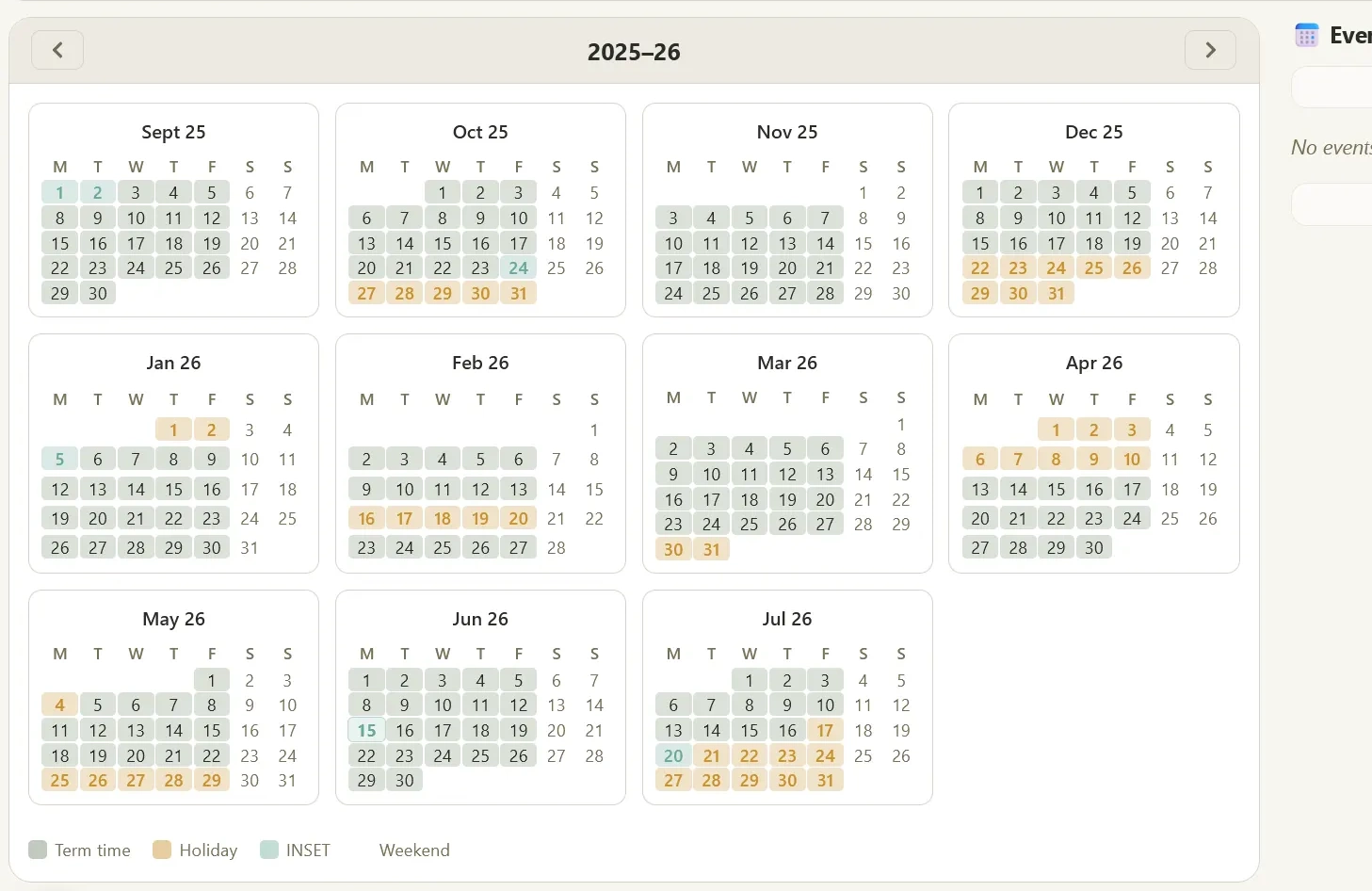
Teacher Task Manager is a teacher calendar app built from the ground up for school staff. Enter your term dates and INSET days once, and every task and deadline is automatically colour-coded against your school calendar. You always know exactly what falls in school time, and what doesn’t.
Everything a teacher needs to manage their school schedule in one place. The core calendar, timetable and term planner are free forever, with no card needed.
Set up your timetable once (class, room, period) and see your full weekly schedule at a glance. Know exactly what you’re teaching before the week begins.
Enter your term dates, INSET days and half-terms. Every task deadline is colour-coded: green for school days, amber for INSET, grey for holidays, so you never plan work for a day off.
Switch to calendar view and see all your tasks plotted by due date against your school term. Spot overloaded weeks at a glance and rebalance before things pile up.
A focused daily view showing exactly what’s on your plate today and what’s coming up this week, filtered to school days only.
Two-way sync with Google Calendar (Pro). Your tasks appear in your Google Calendar and Google events flow back into the app: one schedule, two tools.
No app store needed. On Android, open it in Chrome and tap Add to Home screen; on iPhone or iPad, use the Share menu in Safari. It then opens full screen like a normal app and works offline, so your timetable and calendar load even on patchy school Wi-Fi or no signal at all.
A teacher’s schedule is more than a timetable. Your week is lessons, duties, meetings, marking windows and deadlines, and most schedule apps only show you one of those at a time. Teacher Task Manager works as a complete teacher schedule app: the weekly timetable shows what you’re teaching period by period, the school calendar knows which days are term time, and your tasks are plotted against both.
Setup takes minutes. Add your timetable once, enter your term dates and INSET days, and your school schedule builds itself around them. From then on you can check tomorrow’s schedule from your phone in the staffroom, even with no signal, and because marking and planning live alongside your schedule, a free period isn’t just an empty slot: it’s where your highest-priority task is waiting.
Google Calendar is great for personal scheduling. But as a teacher schedule app, it has real gaps:
Teacher Task Manager uses Google Calendar sync (Pro) so you don’t have to choose. Keep Google Calendar for personal events and use Teacher Task Manager for your school workload, and they stay in sync automatically.
If you are comparing a few tools before you settle on one, our rundown of what makes the best teacher planner app covers the criteria that actually matter once you are teaching.
Other ways Teacher Task Manager fits your school week.
Free to start, no card needed. Add your term dates and timetable, and you're ready in minutes.